
Before starting
⚠️ Warning – Wireless Temperature Probe Replacement
To ensure a successful replacement of your wireless temperature probes, it is essential to follow the procedure exactly as described.
Important: After removing the cold probe, you must wait at least 10 minutes before installing the new probe. This allows the system to update correctly and ensures that the new probe is detected by the Fleet Management Hardware.
Failure to respect this mandatory waiting time may result in the new probe not being detected.
Tutorial video
Step 1 : Plan & prepare (MyConnectedFleet platform)
From the blue navigation bar on the left, click the temperature icon, then select “Sensors” and click the “Temperature” button.
Once the sensors are displayed, identify the probe that needs to be replaced by looking for the “Expired” or “To be replaced” status.
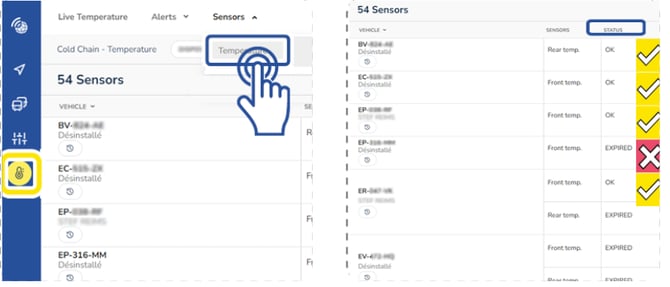
Optional: You can click on “Export” → “CSV Export” to download the data and print it if needed.
Step 2 : Wake-up & Sensor Removal
To activate the “Wake-up” system, turn the engine ON for 2 minutes, then turn the engine OFF.
A- Check Mac
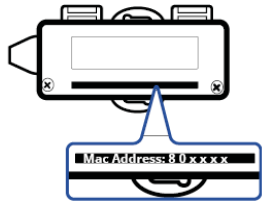
Use the MAC Adress on the transmitter to find the expired probe in your vehicle.
B- Remove support
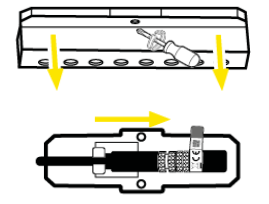
If applicable: remove the probe mounting support and carefully remove the probe from the holder.
C- Unscrew sensor
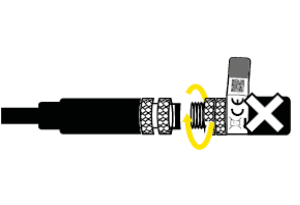
Unscrew the probe from the transmitter.
Step 3 - Mandatory 10-minute wait
⚠️ Warning - DO NOT SCREW IN THE NEW SENSOR YET!
After reomoving the old probe you must wait AT LEAST 10 MINUTES before installing the new one.
FAILURE TO DO THIS MAY RESULT IN THE NEW PROBE NOT BEING DETECTED
Step 4 - Install & verify (10 min later)
Install new sensor
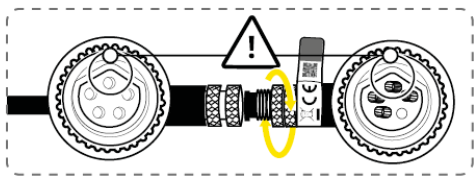
Ensure the PINS align correctly. Push the new probe gently into the connector and tighten the locking collar.
Verify & recycle (post-installation)
A- Check the status is showing OK
You can verify it on the MyConnectedFleet platform. Usually it takes up to 20min to update.
B- What to do with the expired probe?
Collect and group you used probes and then :
- Option 1 : Return used probes to: MICHELIN Connected Fleet Retour - CORDON CMS - Z.A. du Muehlbach - 68153 RIBEAUVILLÉ CEDEX - FRANCE
- Option 2 : Contact MCF at: expedition@michelinconnectedfleet.com, with your contact details and address and we will arrange a collection.