
What is the purpose of the Vehicle page?
The ‘Vehicle's’ screen lists the vehicles you have installed on MyConnectedFleet.
Where can I find the Vehicle page?
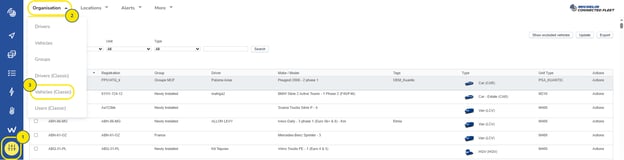
- First click in the main menu (on the left-hand side of the page) on “Settings, Alerts & Locations” button
- Second click in the secondary menu (top of the page) on the “Organisation” button
- Third click in the category on “Vehicles” button
Update vehicle
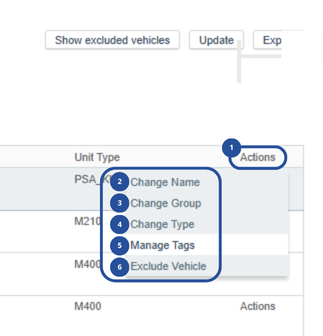
- To change a Vehicles Group or Type, click the "Actions‟ button next to the relevant Vehicle and select the required option.
- Change Name: Correct or change a Vehicle registration
- Change Group: Assign the Vehicle to a different group
- Change Type: Choose the type that matches the vehicle – The vehicle icon shown on the map will match this setting
- Manage tags
- Exclude vehicle